
Sending a customer's bill on WhatsApp
Delivery orders, phone orders, customers who don't want a paper slip: more and more bills in Pakistan go out on WhatsApp. There are three ways to send one. Here is what each looks like to the customer, when to use it, and how to avoid the usual "number not on WhatsApp" problem.
Updated 15 October 2026 · Works with the free bill maker and with ZappoPOS.
Three ways, compared
| Send as | The customer sees | Best for |
|---|---|---|
| Picture (PNG/JPG) | The bill right in the chat, like a printed slip | Almost every shop bill |
| A file to tap and open; prints cleanly on A4 | Customers who forward bills to an office or claim expenses | |
| Text message | Items, quantities and total as plain text | Slow phones and weak signal; easy to read and copy |
1. As a picture
The most familiar way: it looks like the slip the customer would have got at the counter, and it opens without a separate app.
- Make the bill on your phone or computer.
- Save it as a picture. On a phone, many billing apps open the phone's share menu directly, so you can pick WhatsApp and the contact in one go.
- On a computer, download the picture, open WhatsApp Web or the WhatsApp desktop app, open the chat, and attach the picture with the + button.
Avoid photographing a paper bill with your phone camera. It's slow, often blurry, and the customer can't read the small print. A bill made as a picture is sharp at any zoom.
2. As a PDF
Attach it the same way as a picture, with + → Document. PDFs keep their size when printed, so they suit wholesale customers, offices and anyone who files bills. The downside: the customer has to tap to open it, and the chat shows only a file name.
3. As a text message
A short message with the items and total works even on the slowest connection, and the customer can copy the amount straight into a payment app. A good bill message looks like this:
Noor General Store
Bill 1024 · 15 Oct 2026

Washing powder 1kg  1 × 520 = 520
Tea 190g            2 × 395 = 790
Sugar 1kg           3 × 165 = 495

Total: Rs. 1,805
Thank you!
Typing this by hand for every customer takes too long, which is why billing software builds the message for you.
Phone numbers: 03xx or 923xx?
You can open a WhatsApp chat with any number, without saving it as a contact, using a link like https://wa.me/923001234567. The number must be in international form:
- Drop the leading 0:
0300 1234567becomes300 1234567. - Put 92 in front:
923001234567. - No
+, spaces or dashes in the link.
If you get "The phone number shared via url is invalid" or "not on WhatsApp", it is almost always the 0 that was left in.
Doing it in one step in ZappoPOS
In ZappoPOS, Share on a finished bill (or Alt+S on the New Bill screen, which saves and shares together) opens one window with all three ways:
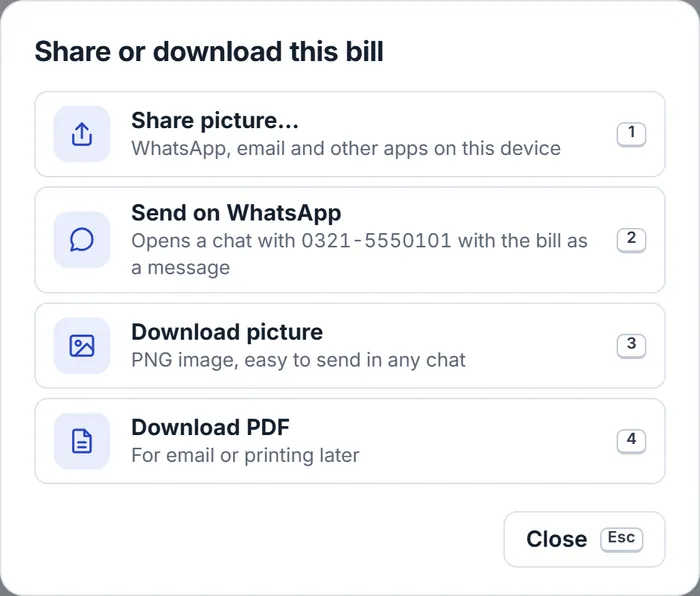
- Share picture… (phones): opens the phone's share menu with the bill as a picture; choose WhatsApp and the customer.
- Send on WhatsApp: opens WhatsApp with the bill as a text message. If the bill has the customer's mobile number, ZappoPOS changes
03xxto923xxand opens their chat directly. - Download picture and Download PDF: save the bill to send from WhatsApp Web or to keep.
Every bill is saved in the shop's bill list, so if a customer says "send it again", you search their name or number and share it again in seconds.
Good habits
- Put your shop's own phone number on the bill, so the customer can reply to order again.
- Use the same number for the shop every time. Customers save it, and your chat history becomes your order history.
- Send the bill before the rider leaves, so the customer knows the amount to pay on delivery.
- Ask before sending offers to customers who only gave you their number for a bill.
Questions
Something else? Ask the Zappo Team.
Which is better for the customer: a picture or a PDF?
A picture. It opens straight inside the chat on any phone and shows in the chat preview. A PDF is better when the customer needs to forward it to an office or print it on A4.
Do I need WhatsApp Business?
No. Everything here works with ordinary WhatsApp. WhatsApp Business adds a shop profile, labels and quick replies, which help if you get many orders on WhatsApp, but you don't need it to send bills.
Why does WhatsApp say the number isn't on WhatsApp?
Usually the number was written as 0300… instead of 92300…. WhatsApp links need the country code without the 0 and without +. ZappoPOS changes 03xx numbers to 923xx for you.
Can I send a bill without saving the customer's number?
Yes. A wa.me link with the number opens the chat without saving a contact. ZappoPOS uses this when the bill has a customer phone; without one, WhatsApp lets you pick the contact.
Can I send a bill in Urdu?
Yes. A picture or PDF shows Urdu exactly as printed. In ZappoPOS, set the bill language to Urdu in App settings.
Send your next bill in one tap.
ZappoPOS makes the bill, keeps a copy, and sends it on WhatsApp as a picture, PDF or message. Free for 7 days.